Design and Evaluation of Demosaicing Algorithms for RGBW CFA
Introduction
Engineering in the commercial imaging sector knows nothing of patience; if anything, the pace at which camera technology is growing is faster than ever. Improvements are being made at an incredible pace across the entire range of the imaging system. One aspect that has not seen this pace, however, is one that has seen itself roughly constant since its introduction forty years ago, in 1976: the Bayer color filter array.
Color filter arrays represent a key .. blahblahblah ***TODO: finish, say more.
- TODO: Talk about
Summary
Related Work
Novel CFAs, compressive demosaicing, etc.
Image capture
Working with a prototype proprietary imaging sensor imposes certain restrictions on usability. Concretely, all management of imaging parameters must be manually controlled from an external computer via a USB link. The company, OmniVision, provided a software package, OVTAPanther, to mediate this process.
Sensor parameters
Through OVTAPanther, control was granted in the following areas: image resolution, exposure time, and sensor gain. (Also granted control of were several other parameters not relevant to the work at hand.) As the lens was a small generic lens fixed in place above the sensor, no control was possible over focal length or aperture.
It was important to use the maximum resolution of the sensor, and to be consistent through captures, as at this point neither the tessellation of the CFA was known, nor was it known if the edges of smaller resolutions would exactly between CFA repetitions. If the latter case turned out to be false, the overall alignment of the CFA pattern throughout the image would be shifted, throwing off most demosaicing algorithms which rely on set, known mosaics.
Though sensor gain and exposure time would both allow control over overall exposure, the behavior of the gain of this sensor and its effects on the image were not well characterized, therefore a choice was made to use the lowest gain possible (1x in OVTAPanther, ostensibly no extra digital gain) in order to eliminate this variable from affecting results. With both aperture and gain removed, our control over exposure then rested solely on exposure time, or shutter speed, which would be the primary variable of interest during capture.
Capture setup and scene selection

In order to stabilize the small sensor over the course of capturing multiple exposures, the device was secured using a small vise-like mount which was then attached to a tripod mount plate for positioning. The device was then connected via USB to a small laptop. Proper orientation of the device was determined through the live preview display of OVTAPanther.
Due to the novel nature of the device, pure simulation of the mosaic using standard test images was determined to inadequate. Particularly due to the potential of the RGBW in regards to dealing with high dynamic range scenes, it was important not to use test images from non-HDR capable devices, but rather capture true HDR scenes in reality. From these scenes, the HDR potential can be tested.
In pursuit of the goal of HDR capture, HDR scenes were selected around Stanford campus. In order to satisfy the criterion, scenes were required to have characteristics that would challenge most standard imaging devices. Therefore priority was given to scenes that paired very bright regions (often due to strong sunlight) with comparatively dim regions (often in sun shadow, or building interiors). Several scenes were selected:
- The Crothers courtyard -- Direct sun on field and buildings, paired with dark shadows from building and trees.
- Hoover Tower -- Brightly lit tower and construction area, with strong shadows from large tree.
- Memorial Church ceiling -- Strong diffuse lighting from skylight, paired with dark from the other ceilings in the church
- Memorial Church stage -- Bright regions in the stained glass, with dark regions in the ceiling and the shadows of the statue.
- Memorial Church side -- Brights in the stained glass, shadows in the pews and chairs.
- Memorial Church doorway -- Highlights in the sky and outdoor quad, with near-black regions in the interior of the church.
- Main Quad arcade -- Highlights from direct sunlight with darker regions in the ceiling of the arcade
- Roundabout Trees -- Highlights from the path and building, with most of the image in shadow from the trees
Several images were also taken at night. While night images often are also HDR, these images also allow comparisons to standard imaging devices in terms of requisite exposure: Would the white pixels of the image allow for shorter shutter speeds while still recovering reasonable signal? Several night images were selected:
- Main Quad arch -- Good light on the arch, with dimly lit Hoover Tower and roofs of arcades
- Main Quad lamp -- Strong direct light from the lamp, with nearly everything else underexposed.
- Path from Engineering Quad -- A good mix of moderately lit regions with dark throughout
Present in each image is the Macbeth ColorChecker used for reference and color-correction. The ColorChecker was typically placed in darker regions of the scene, as these would be the regions most challenging for accurate color rendition.
Images were taken over a range of exposure lengths in order to maximize coverage and potential. Though true intensity of light was not measured at the time of capture, it can be estimated through knowledge of the spectral response curves and the range of exposures captured.
It is particularly important to note that the capture of these scenes through this sensor allow for work on many novel image processing techniques for this CFA architecture. Our work is only a small attempt at using the new data available in such a design, and we hope that others will build off this dataset and design even better algorithms for dealing with such data.
- Scene reference images, taken with consumer camera
-
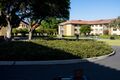 Crothers Courtyard
 -
 Hoover Tower
 -
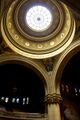 Memorial Church ceiling
 -
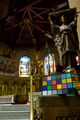 Memorial Church stage
 -
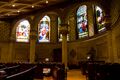 Memorial Church side
 -
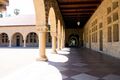 Main Quad arcade
 -
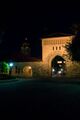 Main Quad arch
 -
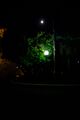 Main Quad lamp
 -
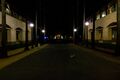 Path from Engineering Quad


Image Processing
Determining CFA orientation
- TODO: Add spectral curves/work done earlier?
- TODO: Talk about problems; talk about how they pop up in algorithms that we use; talk about why they pop up; talk about ways to address them, and problems.